
Most Shopify stores don’t have a review problem. They have an asking problem. The request goes out the day the order ships, before the parcel has arrived, or it never goes out at all because someone meant to send it by hand. A product page sits on zero reviews for months while the customers who loved it never get asked. Asking at the right moment is the biggest lever for getting more reviews on Shopify.
Review request emails fix that when they’re automated properly: triggered by delivery rather than by the order, timed to how long the product takes to judge, sent once with one reminder, and stopped the moment the customer replies. This guide covers the timing, the flow, what to put in the email, what happens after the review arrives, and the rules on incentives. If you’re new to flows, our Shopify email automation guide shows where review requests fit among the other automations a store runs.
The short answer: send the first review request 3 to 14 days after the order is delivered (longer for products people need weeks to judge), ask about one product, let customers rate it from the email, ask for a photo, send one reminder 5 to 7 days later, and skip anyone with a refund, return or open complaint.
What a review request email is (and what it isn’t)
A review request email is a single automated message, or a short sequence of two, that asks a customer who has received an order to rate and review what they bought. It’s a triggered email: it starts on its own when an order reaches a certain status, not when you press send.
It isn’t the order confirmation or the shipping update. Those are transactional messages with a different job. Folding a review ask into the shipping email is the most common way stores end up asking for feedback on a product nobody has opened yet.
It also isn’t a newsletter or a sale. One job per email: get the review. Cross-sells and discount codes belong in the after-review flow, which we cover below. If you want ready-to-copy wording, our review request email templates give a dozen variations. This guide is about the automation behind them.
Why automate review requests at all
Reviews do the selling on the product page, and the first few count the most. The Medill Spiegel Research Center at Northwestern University found that the purchase likelihood for a product with five reviews is 270% greater than for a product with none, and that the benefit of each additional review drops off quickly after the first five (Spiegel Research Center). The same research found reviews matter more for expensive items: conversion rose 380% for a higher-priced product when reviews were shown, against 190% for a lower-priced one.
Two practical conclusions follow for a store owner:
- Coverage beats volume. Getting every product to a handful of reviews is worth more than piling reviews onto your bestseller. An automated flow asks about every order, so slow-moving products collect reviews too.
- Expensive products deserve the most attention. If you sell a $40 candle and a $400 lamp, make sure the lamp’s buyers get the ask, and give them longer to use it before you send it.
Sending review request emails by hand doesn’t scale past a few orders a week, and it fails at the worst time: in a busy season, when orders are highest and the person who sends the emails is busiest. A flow runs on every order, at the right moment, and needs nothing from you once it’s set up.
When to send review request emails
Timing decides most of your response rate. Ask too early and the customer has nothing to say. Ask too late and the excitement has worn off.
Trigger on delivery, not on the order
For review request emails, the right starting point is the date the parcel arrived, not the date it was ordered or shipped. Shipping times vary from one day to three weeks, so a fixed “7 days after order” delay lands before delivery for some customers and long after it for others.
On Shopify, delivery status comes from the carrier’s tracking events when the fulfillment has a tracking number. If you ship without tracking, the order stays “On its way” until you mark it as delivered yourself (Shopify Help Center). If a lot of your orders ship without tracking, use “fulfilled” plus your typical transit time as a fallback trigger.
On WooCommerce, the usual trigger is the order moving to “completed.” Many stores mark orders completed when they ship, so add your average transit time to the delay.
Then wait as long as the product takes to judge
After delivery, wait long enough for the customer to actually use the product. A bag of coffee can be judged in a few days. A serum, a supplement or a mattress needs weeks.
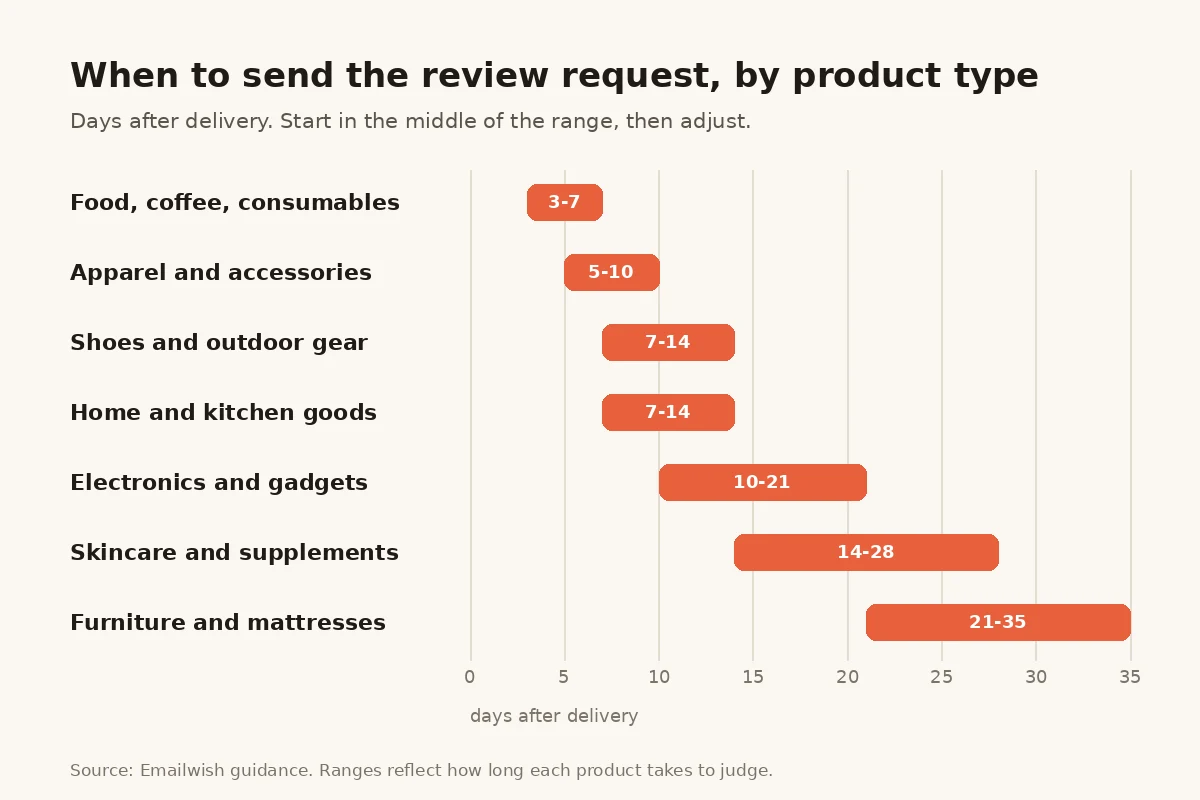
| Product type | Wait after delivery | Why |
|---|---|---|
| Food, coffee, consumables | 3 to 7 days | Used straight away |
| Apparel and accessories | 5 to 10 days | Time to try on and wear once or twice |
| Shoes and outdoor gear | 7 to 14 days | Needs a few real outings |
| Home and kitchen goods | 7 to 14 days | Needs some everyday use |
| Electronics and gadgets | 10 to 21 days | Setup, then real use |
| Skincare and supplements | 14 to 28 days | Results take weeks to show |
| Furniture and mattresses | 21 to 35 days | Long adjustment period |
These ranges are our starting points, not industry benchmarks. Begin in the middle of the range for your category, then move it by a few days at a time and watch whether more customers reply.
If one order mixes product types, time the request for the product that takes longest to judge, or send separate requests per product if your tool supports it.
How to Automate the Timing of Review Request Emails
The timing advice above only works if your tool knows when each parcel actually arrived. Most stores fake it with a fixed timer: “send 10 days after the order” or “7 days after fulfillment.” That timer is a guess about shipping, and it’s wrong for a lot of orders.
Emailwish has built-in delivery tracking, so the review request flow can start when an order is marked Delivered rather than after a manual delay you’ve estimated. The ask follows the parcel, not the calendar.
Why a delivered trigger beats a fixed timer
| Fixed timer after order or fulfillment | Delivered trigger | |
|---|---|---|
| Starts when | A set number of days has passed | The order reaches Delivered |
| Slow shipment (two weeks) | Request arrives before the parcel | Request waits for the parcel |
| Fast shipment (next day) | Customer waits a week longer than needed | Request can go out while the product is new |
| International and mixed carriers | One delay can’t fit every route | Each order runs on its own delivery date |
| Upkeep | Re-tune the delay when carriers or warehouses change | Nothing to re-tune |
The failure of a fixed timer is lopsided. A request that lands a few days late costs you a little enthusiasm. A request that lands before the parcel costs you the review, because the customer has nothing to rate, and it can earn you a confused reply or a low rating about delivery instead of the product.
Add a short wait only where the product needs it
A delivered trigger tells you the parcel has arrived. It doesn’t tell you the customer has used what’s inside. For products judged on first use, such as coffee, snacks or a phone case, a wait of a few days after delivery is plenty. For skincare, supplements, shoes or a mattress, add the longer wait from the timing table above so the customer has time to form a view.
Keep it to one wait after delivery. Stacking a delay on top of an estimated shipping time is exactly the guesswork the delivered trigger removes.
Set up delivery-based timing in Emailwish
- Open the review request flow. It’s live from setup, so you’re editing it, not building it.
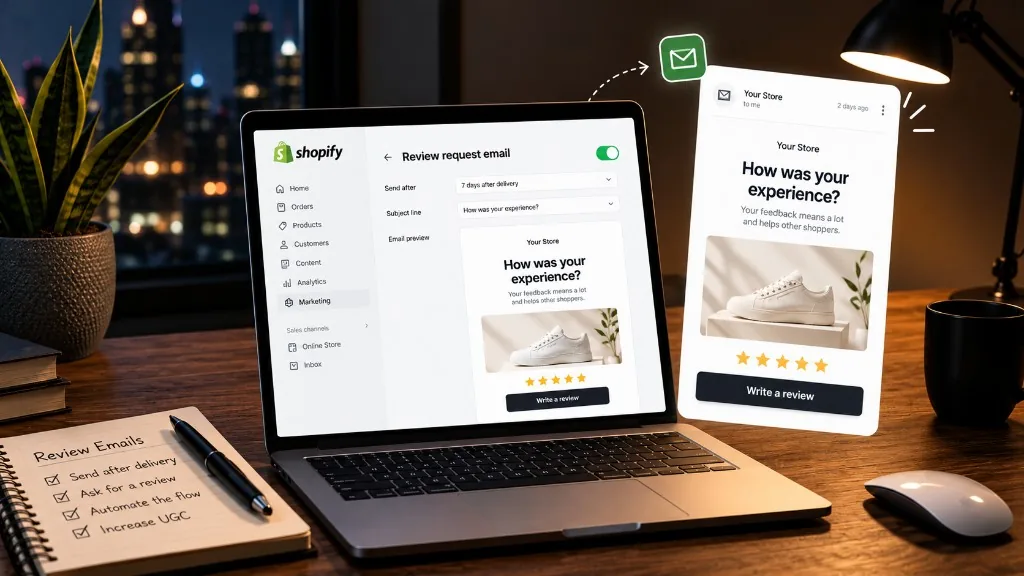
- Check the trigger. Set it to fulfillment status Delivered, as in the screenshot below.
- Set the wait after delivery. Start with a short delay (the example on our reviews page is 3 days) and lengthen it for products that take longer to judge.
- Keep the reminder relative to the first email, 5 to 7 days later, so it also follows the delivery date.
- Place a test order and check that the request waits for Delivered before it sends.
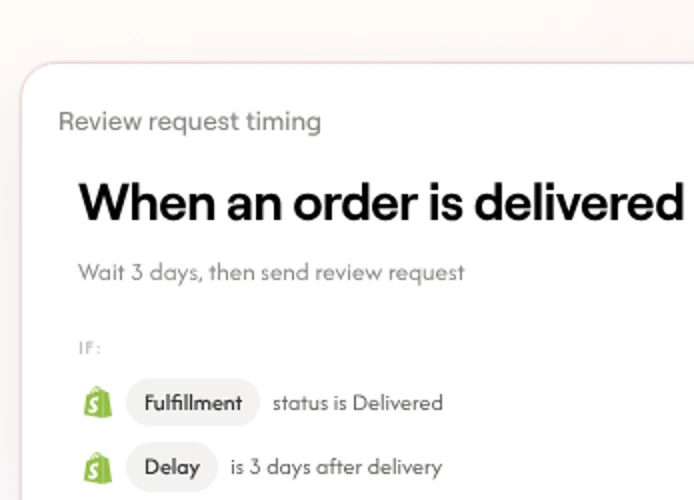
If a few of your orders never reach a delivered status, for example local deliveries you don’t mark as delivered, check how those orders are handled before you rely on the trigger alone.
The review request email flow, step by step
Every automated flow for review request emails, in any Shopify or WooCommerce tool, has the same six parts. Get the filters and the exit right before you spend time on the copy.
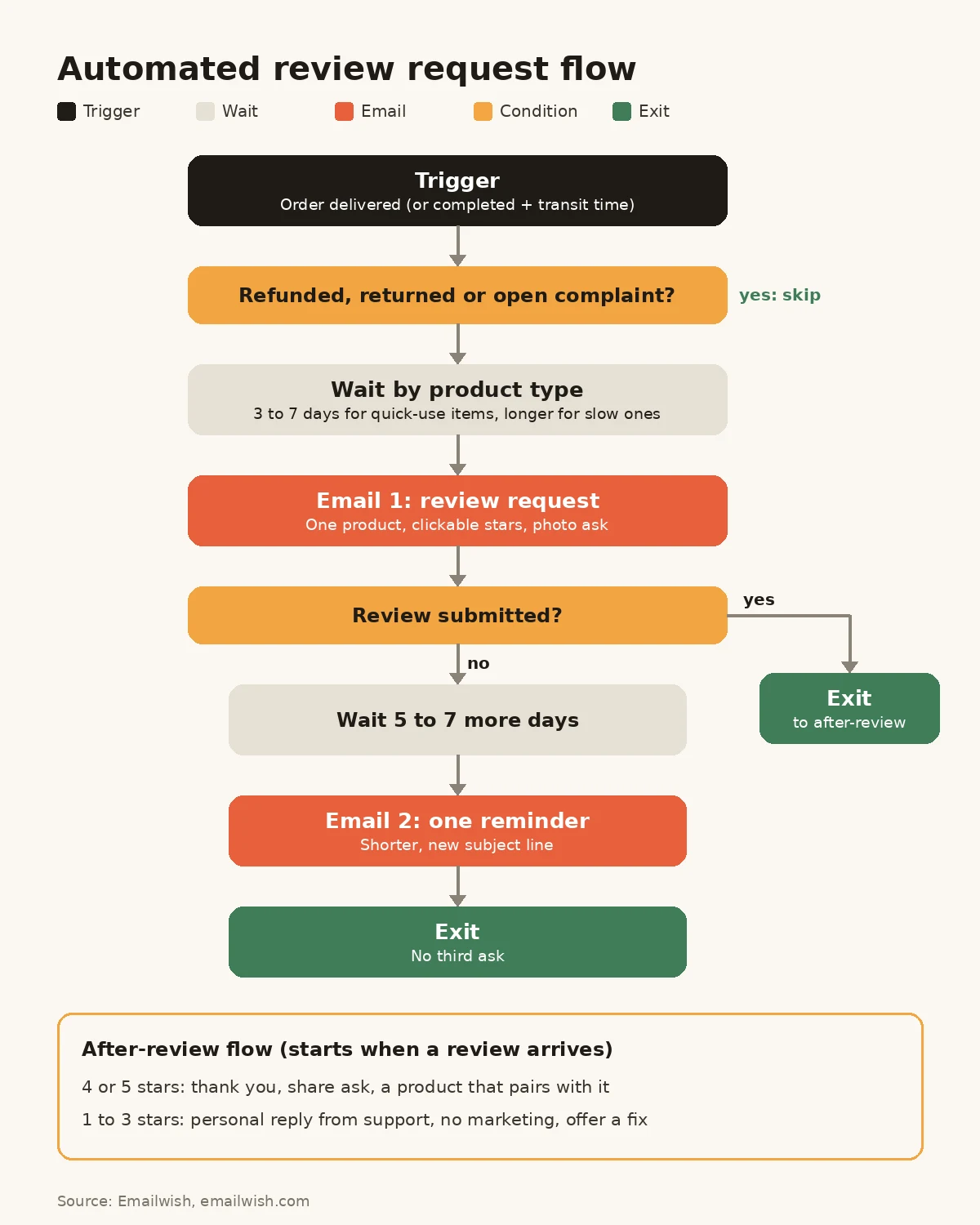
1. Trigger: order delivered
Start the flow when the order is marked delivered (or completed plus transit time, as above). With a delivered trigger, as described in the previous section, there’s no shipping delay to estimate. Trigger it once per order, not per item, unless you deliberately send separate asks per product.
2. Filters: who should not get the ask
Exclude anyone who:
- Has requested a refund or return on the order
- Has an open support ticket or complaint
- Already reviewed this product
- Has unsubscribed from your emails
Asking an unhappy customer for a review while their refund is pending invites a public 1-star rating and shows the store isn’t listening. Fix the problem first. If you run live chat in the same system, a conversation about a damaged or late order is exactly the signal this filter should catch.
3. Wait by product type
Use the timing table above. If your Shopify app lets you set a different delay per product or collection, use it. If it doesn’t, pick the delay for your main category.
4. Email 1: the review request
One product, one clear question, stars the customer can click from the email, and a request for a photo. More on the contents in the next section.
5. Email 2: one reminder
If no review comes in, send one shorter reminder 5 to 7 days later with a different subject line. A second nudge catches people who meant to reply and forgot.
6. Exit
The flow ends when the customer submits a review, or after the reminder. Don’t send a third ask. Someone who ignored two requests isn’t going to write a thoughtful review on the third, and you’re spending goodwill you’ll need for the next order.
How to Automate Review Request Emails
You don’t need to build any of the steps above from scratch. In Emailwish, the review request flow is one of the flows that go live when you install, and Emailwish Reviews runs in the same app as email, popups and live chat. Your review request emails don’t need a separate Shopify review app wired to your email tool.
Here’s the setup, from install to the first published review:
- Install Emailwish from the Shopify App Store. Setup pulls your store name, logo, social links, products and brand details from Shopify, writes the email copy in your brand’s voice and generates the email images. Shopify orders, products, browsing and checkout events then sync in real time.
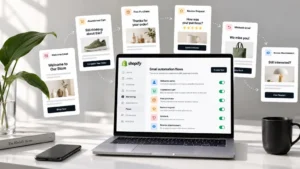
- Find the review request flow already running. It’s one of about 10 flows switched on at setup, alongside welcome, abandoned cart, after-review, form signup and chat follow-up. Every flow stays editable.
- Confirm the delivered trigger and your wait. Use the timing steps in the previous section: trigger on Delivered, then a short wait by product type.
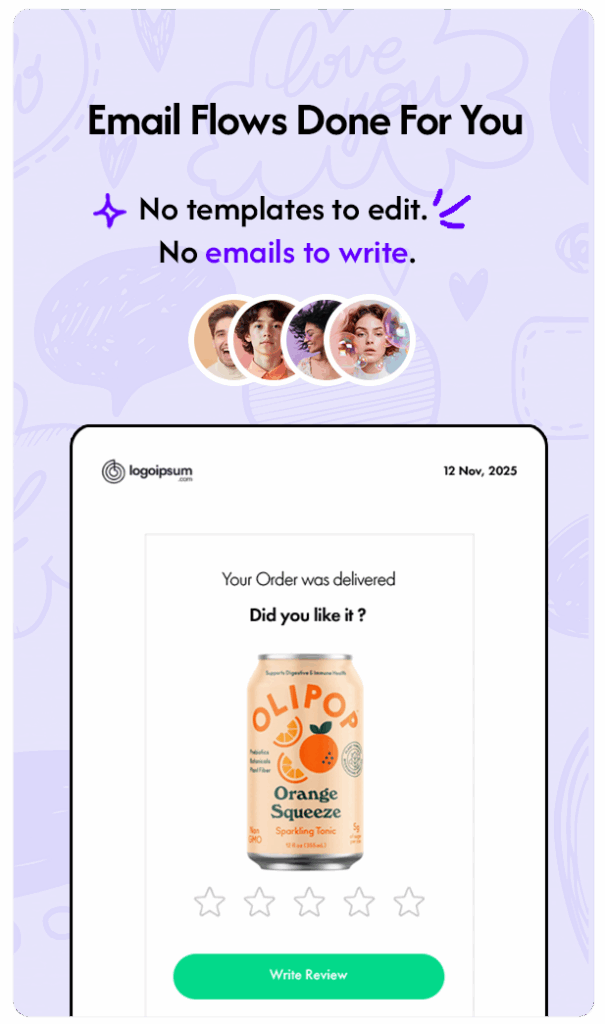
- Review the email. Check the product image, subject line and sender name against the anatomy table below. Customers click through to an on-site review form with a star rating and an optional photo.
- Moderate before anything goes live. You’re notified when a review comes in, and each submission sits next to the reviewer’s order history, the product purchased and their earlier ratings, so you can approve it before it goes live.
- Publish where shoppers decide. Approved reviews attach to the Shopify product and appear on the product-page review wall, and they can show as social proof in your popups.
- Check the after-review flow. It picks up once the review arrives (covered further down).
- Track results. Revenue reporting covers every flow, including the review request and after-review flows.
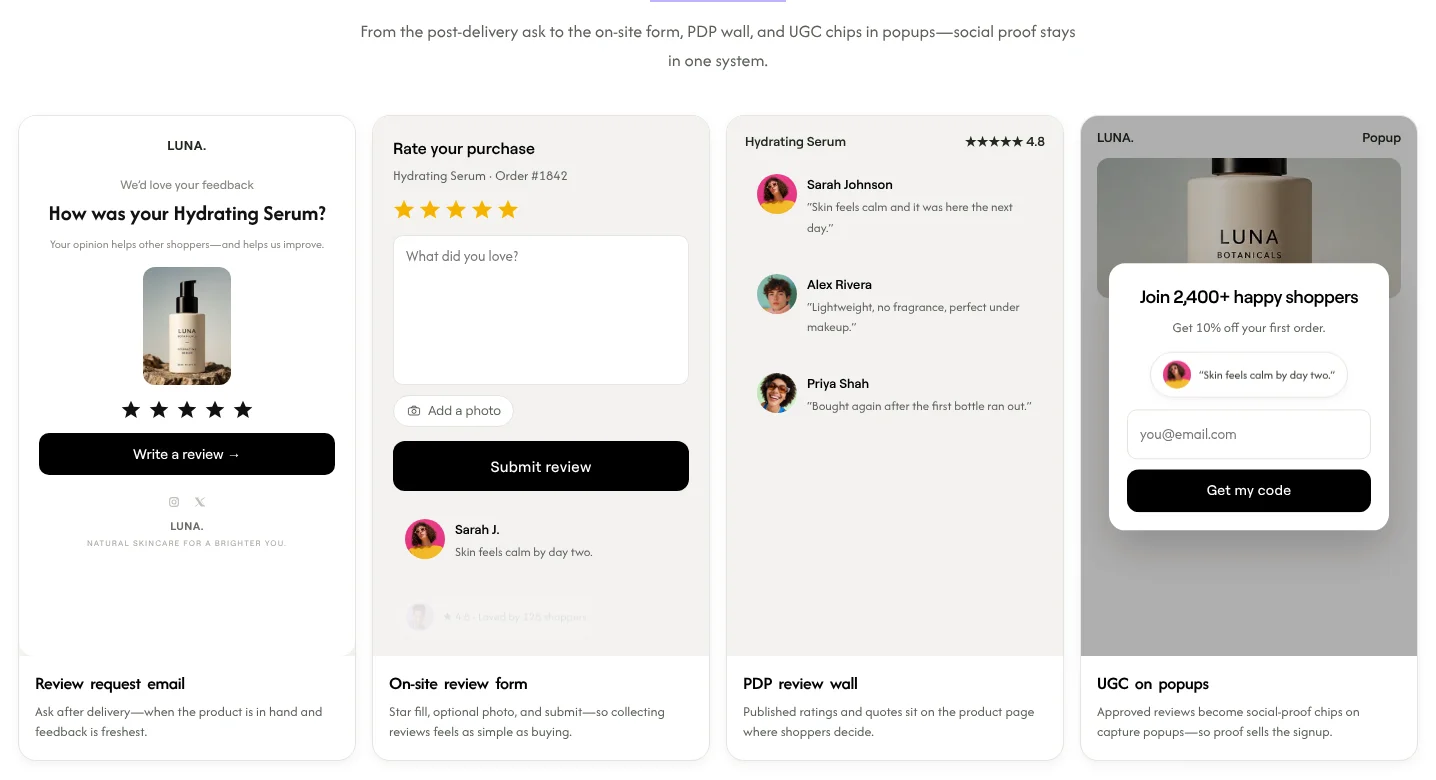
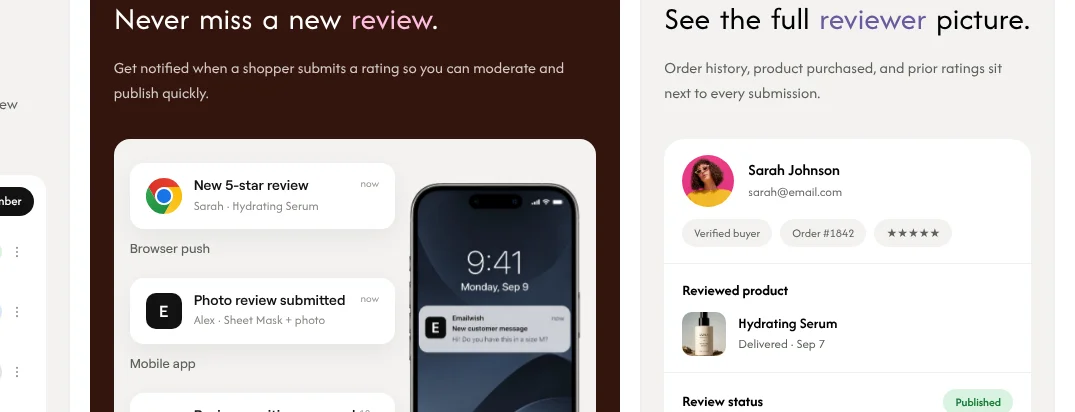
The part an email-only tool can’t do is what happens next. Because reviews, chat, popups and email share one customer profile, a review becomes something you can segment and trigger on. A VIP who leaves a 2-star review can go to a personal follow-up instead of the standard thank-you. A shopper who asked about sizing in live chat and later reviewed the product shows up with both on the same profile. With a separate review app, that data has to sync across, and it often arrives late or not at all.
Where Emailwish is the wrong fit: it doesn’t send SMS. It’s also younger than the long-established review apps and has fewer integrations. If you’re comparing standalone options such as Judge.me, Loox or Yotpo, our list of the top Shopify review apps compares them, and WooCommerce stores can see the best review apps for WooCommerce.
Reviews are included on every Emailwish plan, including the free Seed plan (100 contacts, 1,000 emails a month). Paid plans start at $35 a month on Emailwish pricing.
What to put in review request emails
A review request email works when it takes seconds to act on. Every element should make the review easier to leave.
| Element | What to do | Why it works |
|---|---|---|
| Subject line | Name the product: “How’s your Ethiopia Yirgacheffe?” | Specific beats generic “We’d love your feedback” |
| Sender name | A person at the brand, or the brand name customers know | Feels like a question, not a system message |
| Product image | The exact product and variant they bought | Reminds them what they’re rating |
| Star rating | Five clickable stars that open the form with the rating filled in | The first step takes one tap |
| Photo ask | “Add a photo of it in use” with a clear button | Photos show the product in real use, which a studio shot can’t |
| One call to action | “Write a review” only, no shop links or banners | Every extra link pulls attention away |
| Length | Three to five short lines | Most customers open on a phone |
| Unsubscribe link | Visible in the footer | Keeps your sender reputation healthy and respects the customer’s choice |
Multi-item orders: ask about the one product that most needs reviews, usually the one with the fewest. The Spiegel Research Center recommends prioritising products with a low review count and higher-priced, higher-consideration products, so that’s where the ask does the most good.
An example: a coffee subscription store
Here’s how a small Shopify coffee roaster might write the first email, sent five days after delivery:
Subject: How’s your Ethiopia Yirgacheffe?
Hi Priya,
Your bag of Ethiopia Yirgacheffe arrived last week. How are you finding it?
★★★★★ (tap a star to rate it)
A sentence or two helps other coffee drinkers choose, and a photo of your morning cup helps even more.
[Write a review]
Thanks, Sam, head roaster
And the reminder, a week later:
Subject: 10 seconds for your Yirgacheffe?
Hi Priya, just one tap on the stars below tells us how the Yirgacheffe is treating you. ★★★★★
Both name the product, both are short enough to read on a phone, and neither tries to sell anything.
A second example: a skincare brand
A skincare store selling a hydrating serum would wait longer, around three weeks after delivery, because customers need time to see a difference. The subject line can say so: “Three weeks in: how’s your skin?” The body asks one extra question that makes the review more useful to the next shopper, such as skin type, and asks for a photo only if the customer is comfortable sharing one.
After the review arrives: the after-review flow
Most stores stop the moment a review comes in. That’s a waste, because a review is the clearest signal you’ll get about how a customer feels. Use the star rating to decide what happens next.
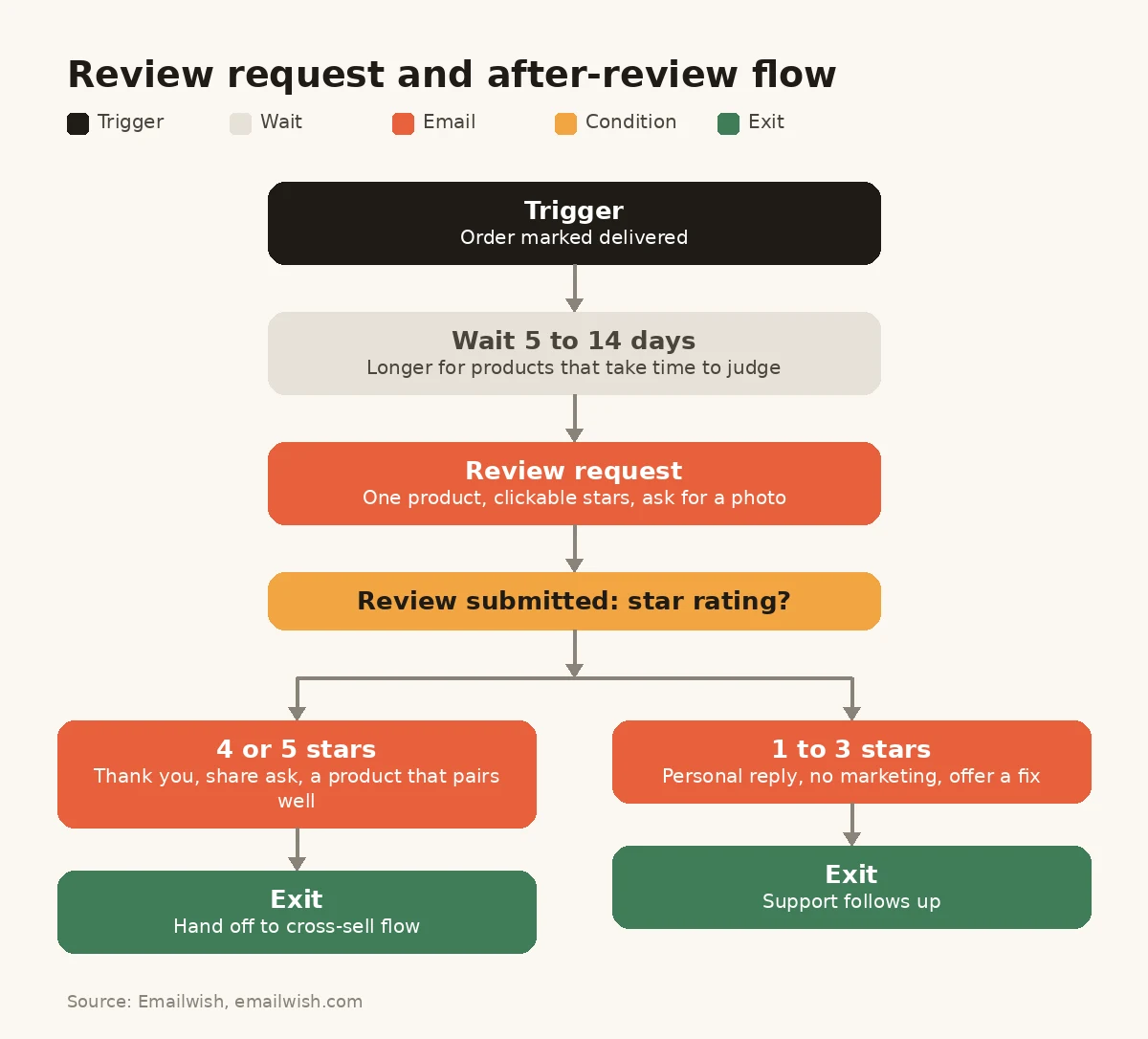
- 4 or 5 stars: send a thank-you, ask them to share the review or tag the brand on social media, and suggest one product that pairs with what they loved. This is where a cross-sell belongs, not in the review request itself.
- 1 to 3 stars: send no marketing at all. Send a personal reply from support or the founder asking what went wrong, with a direct way to get a replacement or refund. Our guide on how to respond to negative reviews covers the public reply.
A repeat customer who leaves a 2-star review and gets a “you might also like” email the next day probably won’t order again. One who gets an apology and a fix often does.
Reviews are also content you can reuse. Approved reviews can appear on the product page, in your welcome series, in abandoned cart emails next to the product the shopper left behind, and on signup popups.
Incentives, honesty and the FTC rule
Offering something in return for a review is allowed in the US, within limits. The FTC’s Rule on the Use of Consumer Reviews and Testimonials took effect on 21 October 2024. According to the FTC’s own guidance (FTC Q&A):
- You may offer an incentive for a review, as long as there’s no express or implied requirement that the review be positive. “Tell us how much you loved it and get a $5 coupon” implies it has to be positive, and the FTC uses almost exactly that wording as an example of what not to do.
- Failing to disclose that a review was incentivised can still violate the FTC Act.
- Emailing every purchaser and asking for a review is a “generalized solicitation” and is treated as safe under the rule’s insider-review provisions.
- The rule doesn’t specifically ban asking only the customers you think are happy, but the FTC says that practice could violate the FTC Act.
In practice, that means:
- Send the request to every eligible buyer, not only the ones you expect to be happy (the refund and complaint filters above are about timing and service, not about hiding criticism).
- If you offer a reward, offer it for any honest review, and label incentivised reviews as such.
- Never write “leave us a 5-star review.” Ask for an honest one.
- Publish negative reviews that meet your content policy. Spiegel’s research found purchase likelihood typically peaks at average ratings between 4.0 and 4.7 and falls as ratings approach 5.0, so a few critical reviews make the rest more believable.
This is a summary of US rules, not legal advice. If you sell in the EU, the UK or elsewhere, check the consumer protection rules that apply there too.
Common mistakes with review request emails
- Sending on order or shipment. The customer hasn’t got the product yet. Trigger on delivery.
- One delay for every product. Coffee and mattresses don’t need the same wait.
- No refund or complaint filter. The angriest customers get asked first, at the worst possible moment.
- Asking about every item in a big order. A list of eight products to rate gets none rated. Pick one.
- Making the customer log in. Every extra step loses reviews. The form should open with their order already recognised.
- Three or more reminders. One reminder is enough.
- A discount for “positive” reviews. It breaks the FTC rule and makes your reviews worthless to shoppers.
- Collecting reviews and doing nothing with them. If reviews don’t show on product pages, in emails and in popups, most of their value is lost.
How to measure your review request flow
Track a few numbers monthly, not daily:
- Review rate: reviews submitted divided by review requests delivered. This is the number timing and copy changes should move.
- Photo share: the percentage of reviews that include a photo.
- Rating mix: a sudden rise in 1 to 3 star reviews on one product usually points to a product or fulfilment problem, not an email problem.
- Coverage: how many products still have fewer than five reviews. Given the Spiegel findings, this is the number to bring down.
- Revenue from the after-review flow: what the thank-you and cross-sell emails earn.
When you change something, change one thing at a time (the delay, the subject line or the sender name) and give it a few weeks of orders before you judge it.
Review request emails checklist
Before you switch your flow on, check each item:
- ☐ Triggered on Delivered (or completed plus transit time where delivery isn’t tracked), not on order
- ☐ Delay set by product type
- ☐ Refunds, returns, open tickets and existing reviewers excluded
- ☐ One product per email, with its image
- ☐ Clickable stars that open the form with the rating filled in
- ☐ A photo ask
- ☐ One reminder, then exit
- ☐ No sentiment-conditioned incentives; incentivised reviews labelled
- ☐ Separate follow-ups for 4 to 5 stars and 1 to 3 stars
- ☐ Reviews published to product pages and reused in emails and popups
- ☐ A test order sent to yourself from start to finish
FAQ
1. When should I send a review request email?
After the order is delivered, not when it’s placed or shipped. Wait 3 to 7 days for products used straight away, 1 to 2 weeks for apparel, home goods and gear, and 2 to 5 weeks for skincare, supplements and furniture. Send one reminder 5 to 7 days after the first email.
2. Should I trigger review requests on delivery or after a fixed delay?
On delivery. A fixed delay after the order or fulfillment guesses at shipping time, so some requests land before the parcel and others arrive late. A delivered trigger starts each request when that order arrives. Emailwish has built-in delivery tracking, so its review request flow can trigger on Delivered, with an optional short wait for products that take longer to judge.
3. How many review request emails should I send?
Two at most: the request and one reminder. The flow should stop as soon as the customer leaves a review.
4. Can I offer a discount for a review?
In the US you can offer an incentive for a review, but not one that’s conditioned, openly or by implication, on the review being positive, and you should disclose that the review was incentivised. See the FTC’s guidance on its consumer reviews rule. Check local rules if you sell outside the US.
5. Should review request emails go to customers who complained?
Not while the complaint is open. Filter out refunds, returns and open tickets, fix the problem, and let the customer back into the flow on their next order.
6. How do I automate review request emails on Shopify?
Use a Shopify app that reads the order’s delivered status and can send the request after a delay you set. In Emailwish, the review request flow is live from setup, triggers on Delivered through built-in delivery tracking, and links to an on-site review form with stars and photos. Our email automation flows for ecommerce guide shows how it fits with your other flows.
7. What’s the difference between a review request and an after-review email?
A review request asks for the review. An after-review email reacts to it: a thank-you and a cross-sell for 4 or 5 stars, a personal fix for 1 to 3 stars.
Review Request Emails: Conclusion
Review request emails are one of the simplest flows to set up and one of the easiest to get wrong. Trigger on delivery, wait as long as the product takes to judge, ask about one product with clickable stars and a photo request, send one reminder, and keep unhappy customers out until their problem is fixed. Then use the rating to decide the next email on your Shopify store, and put every approved review to work on product pages, in emails and in popups. Once it runs, add a winback flow for customers who reviewed but haven’t come back.
If you’d rather not wire a review app to an email tool, Emailwish runs the review request and after-review flows, the review form and the product-page reviews in one Shopify app, so every review lands on the same customer profile your emails use. Install Emailwish free from the Shopify App Store and the review request flow goes live at setup.
We keep our content up to dateSee latest updates
- – Rewritten from scratch: timing by product type, a delivery-based trigger, the step-by-step flow, the after-review flow, FTC incentive rules, a checklist and FAQ.
- – Published


Written and fact-checked under our editorial policy. About Emailwish.